> ## Documentation Index
> Fetch the complete documentation index at: https://hub.hcompany.ai/llms.txt
> Use this file to discover all available pages before exploring further.
# Watch and steer sessions
> Watch a run, intervene while it works, keep the conversation going, and read how it ended.
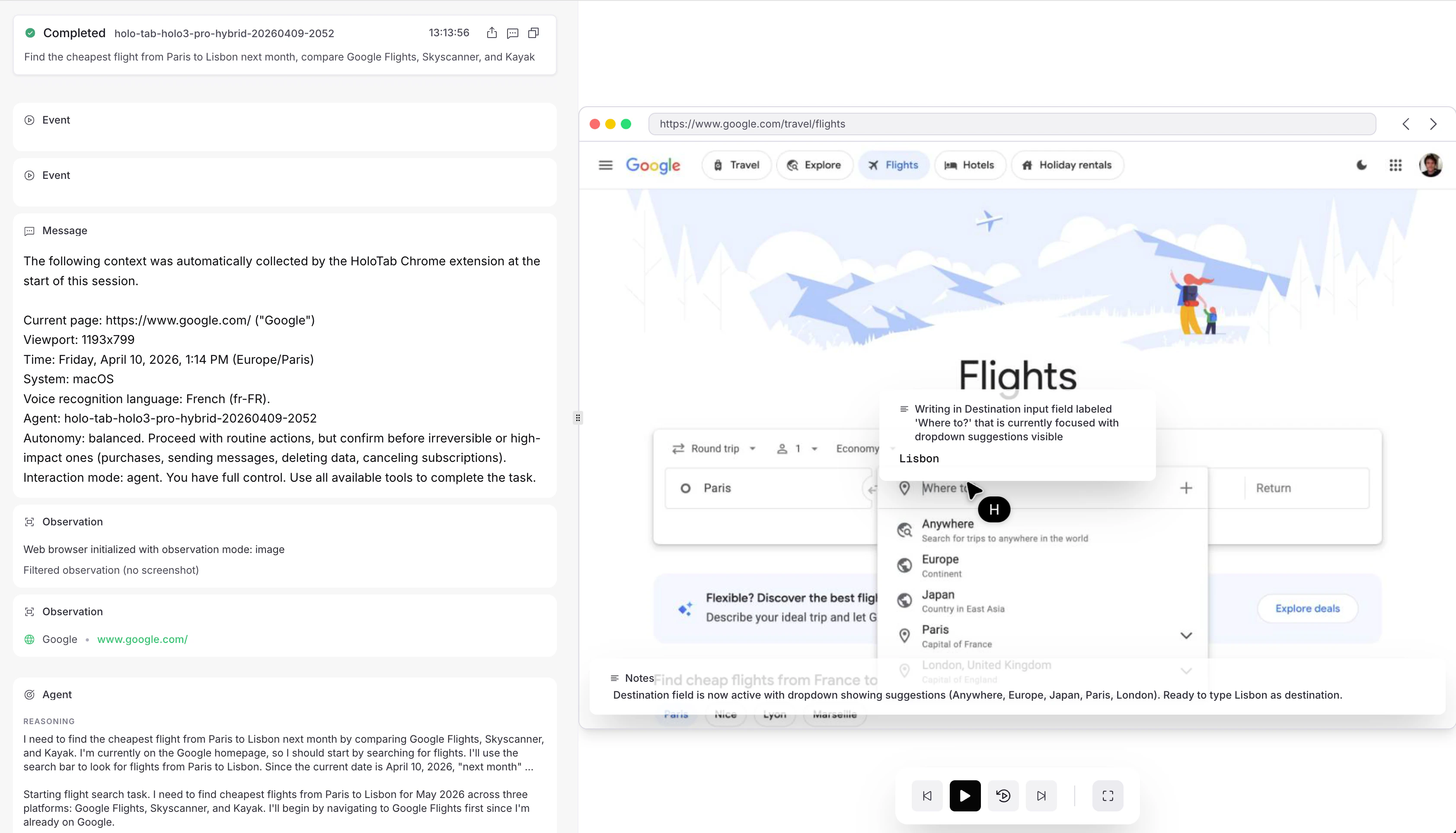 Every session is visible in **Agent View** on the [H Platform](https://platform.hcompany.ai/?product=computeruseagents\&source=docs), and its `agent_view_url` links straight there. Open a running session to see what the agent sees while it works, the quickest way to prompt-tune, debug an unexpected detour, or confirm a run hasn't stalled; once it terminates, scrub through the full trajectory (every observation, action, and message) to audit what happened. The view reads the same [`events`](/computer-use-agents/sessions/events) stream your code does, so anything the API exposes is reflected in the UI.
Everything on this page is addressed to the session's `id` and works the same whether the agent runs alone or [delegates to subagents](/computer-use-agents/multi-agent).
In the Python and TypeScript SDKs, starting a session returns a lightweight handle bound to that `id`, and the snippets below read and steer through it. Every operation is also available as a direct client call or a raw HTTP request, as each reference page shows.
If your organization is at its concurrency limit, a new session first sits in [`queued`](#queued-sessions) and starts on its own once a slot frees up.
## Watch a run
There are three ways to read a session, from cheapest to most complete:
* [`status`](/computer-use-agents/sessions/status) returns a small snapshot of the current [state](/computer-use-agents/sessions/overview#lifecycle), step count, and token usage. Poll it on an interval as a health check or to detect a terminal state.
* [`changes`](/computer-use-agents/sessions/changes) long-polls from an event index: the call blocks until something new happens, then returns the new events and the final `answer` once it lands. Use this while a run is active.
* [`events`](/computer-use-agents/sessions/events) is the complete, paginated record of everything the agent observed and did. Page through it to replay or audit a run after the fact.
```python Python theme={null}
from hai_agents import Client
client = Client()
session = client.start_session(
agent="h/web-surfer-flash",
messages=[{"type": "user_message", "message": "Find the top story on Hacker News"}],
)
session.status() # cheap liveness snapshot
session.changes(from_index=0) # new events + final answer, long-polled
session.get() # the full Session resource
result = session.wait_for_completion() # block until terminal, then read the answer
print(result.status, result.answer)
```
```typescript TypeScript theme={null}
import { HaiAgentsClient } from "hai-agents";
const client = new HaiAgentsClient();
const session = await client.startSession({
agent: "h/web-surfer-flash",
messages: [{ type: "user_message", message: "Find the top story on Hacker News" }],
});
await session.status(); // cheap liveness snapshot
await session.changes({ fromIndex: 0 }); // new events + final answer, long-polled
await session.get(); // the full Session resource
const result = await session.waitForCompletion(); // block until terminal, then read the answer
console.log(result.status, result.answer);
```
### Stream events as they arrive
[`changes`](/computer-use-agents/sessions/changes) is a single long-poll: one request that returns the events available past an index. To consume a whole run as a live feed, the SDK handle exposes `stream()`, an iterator that runs the long-poll loop for you and yields each [event](/computer-use-agents/sessions/events) in order until the session settles. It resumes `from_index` and drops the `204` no-change responses automatically, so you only see events.
By default it stops as soon as the session settles (a [terminal state](/computer-use-agents/sessions/overview#lifecycle), or `idle` awaiting your next message); pass `until="terminal"` to keep the feed open across the idle turns of an [interactive session](#hold-an-interactive-conversation). `stream()` is a read-only view and does not answer tool calls: for runs that use [custom tools](/computer-use-agents/custom-tools), use `wait_for_completion` / `run_session`, which run the tools for you.
```python Python theme={null}
for event in session.stream():
print(event.type)
# With the async client, iterate the same handle with `async for`.
```
```typescript TypeScript theme={null}
for await (const event of session.stream()) {
console.log(event.type);
}
```
## Steer a running agent
As long as the session is not in a [terminal state](/computer-use-agents/sessions/overview#lifecycle), you can intervene:
* Send a message to add context or redirect the agent mid-run. The message is picked up on the next step; a message to an `idle` session also wakes it. See [Send a message](/computer-use-agents/sessions/send-messages).
* Pause and resume to halt the agent with its state preserved (for review or cost control), then continue. Sending a message auto-resumes a paused session. See [Pause](/computer-use-agents/sessions/pause) and [Resume](/computer-use-agents/sessions/resume).
* Force an answer to tell the agent to stop exploring and commit to a final answer from what it has so far. See [Force an answer](/computer-use-agents/sessions/force-answer).
* Cancel to stop the session for good; it ends in `interrupted`. See [Cancel](/computer-use-agents/sessions/cancel).
A blocking run-and-wait call never surfaces the session mid-run: start the session and keep its handle when you need to read or intervene while it works.
Sending a steering message is the most common intervention:
```bash CLI theme={null}
hai sessions send "$SESSION_ID" "Only consider results from the last 24 hours"
```
```bash cURL theme={null}
curl -X POST "https://agp.eu.hcompany.ai/api/v2/sessions/$SESSION_ID/messages" \
-H "Authorization: Bearer $HAI_API_KEY" \
-H "Content-Type: application/json" \
-d '{"type": "user_message", "message": "Only consider results from the last 24 hours"}'
```
```python Python theme={null}
session.send_message({"type": "user_message", "message": "Only consider results from the last 24 hours"})
```
```typescript TypeScript theme={null}
await session.sendMessage({ type: "user_message", message: "Only consider results from the last 24 hours" });
```
The other interventions follow the same shape:
```bash cURL theme={null}
curl -X POST "https://agp.eu.hcompany.ai/api/v2/sessions/$SESSION_ID/pause" -H "Authorization: Bearer $HAI_API_KEY" # halt, state preserved
curl -X POST "https://agp.eu.hcompany.ai/api/v2/sessions/$SESSION_ID/resume" -H "Authorization: Bearer $HAI_API_KEY" # continue where it left off
curl -X POST "https://agp.eu.hcompany.ai/api/v2/sessions/$SESSION_ID/force_answer" -H "Authorization: Bearer $HAI_API_KEY" # stop exploring and commit to a final answer
curl -X DELETE "https://agp.eu.hcompany.ai/api/v2/sessions/$SESSION_ID" -H "Authorization: Bearer $HAI_API_KEY" # stop for good; ends in `interrupted`
```
```python Python theme={null}
session.pause() # halt, state preserved
session.resume() # continue where it left off
session.force_answer() # stop exploring and commit to a final answer
session.cancel() # stop for good; ends in `interrupted`
```
```typescript TypeScript theme={null}
await session.pause();
await session.resume();
await session.forceAnswer();
await session.cancel();
```
## Hold an interactive conversation
By default a session ends as soon as the agent answers. Set [`idle_timeout_s`](/computer-use-agents/sessions/create) when you create it to keep it open: after each answer the session enters [`idle`](/computer-use-agents/sessions/overview#lifecycle) and waits that long for your next message before terminating. One session becomes a multi-turn conversation that keeps its full context and environment state across turns.
```bash cURL theme={null}
# Open an interactive session that stays alive for 10 minutes between turns.
SESSION_ID=$(curl -sX POST https://agp.eu.hcompany.ai/api/v2/sessions \
-H "Authorization: Bearer $HAI_API_KEY" -H "Content-Type: application/json" \
-d '{
"agent": "h/web-surfer-flash",
"idle_timeout_s": 600,
"messages": [{"type": "user_message", "message": "Find the top story on Hacker News"}]
}' | jq -r .id)
# After it answers and goes idle, ask a follow-up in the same context.
curl -X POST "https://agp.eu.hcompany.ai/api/v2/sessions/$SESSION_ID/messages" \
-H "Authorization: Bearer $HAI_API_KEY" -H "Content-Type: application/json" \
-d '{"type": "user_message", "message": "Now open its comments and summarize the discussion"}'
```
```python Python theme={null}
session = client.start_session(
agent="h/web-surfer-flash",
idle_timeout_s=600,
messages=[{"type": "user_message", "message": "Find the top story on Hacker News"}],
)
# After it answers and goes idle, ask a follow-up in the same context.
session.send_message({"type": "user_message", "message": "Now open its comments and summarize the discussion"})
```
```typescript TypeScript theme={null}
const session = await client.startSession({
agent: "h/web-surfer-flash",
idleTimeoutS: 600,
messages: [{ type: "user_message", message: "Find the top story on Hacker News" }],
});
// After it answers and goes idle, ask a follow-up in the same context.
await session.sendMessage({ type: "user_message", message: "Now open its comments and summarize the discussion" });
```
Watch the session's [`status`](/computer-use-agents/sessions/status) flip to `idle` between turns; it terminates once a turn goes unanswered for `idle_timeout_s`.
## Queued sessions
Creating a session while your organization is at its [concurrency limit](/computer-use-agents/plans-and-limits#concurrent-sessions) doesn't fail: the create returns `201` with status `queued`, and the session starts automatically, oldest first, as running sessions finish. A queued session goes through the normal [lifecycle](/computer-use-agents/sessions/overview#lifecycle) (`queued` → `pending` → `running` → terminal) and fires a [webhook](/computer-use-agents/webhooks/overview) on every transition. If you prefer an immediate error, set [`queue: false`](/computer-use-agents/sessions/create) on the create body to get a `429` instead.
Messages sent to a queued session are buffered and delivered when it starts; pause and resume are not available until then, and [cancelling](/computer-use-agents/sessions/cancel) dequeues it immediately. The queue holds up to 1000 sessions per organization; beyond that, creates return `429` again. [Child sessions](/computer-use-agents/multi-agent) are the one exception: a create carrying `parent_session_id` fails fast with `429` at capacity, because a child queued behind its own running parent could wait forever.
Queueing makes batches simple: fire all your tasks at once and let the platform pace them to your quota.
```python Python theme={null}
from hai_agents import Client
client = Client()
sessions = [
client.sessions.create_session(
agent="h/web-surfer-flash",
messages=f"Check price for {product}",
)
for product in products
]
# first ones run immediately, the rest are queued; collect results via webhooks
```
```typescript TypeScript theme={null}
import { HaiAgentsClient } from "hai-agents";
const client = new HaiAgentsClient();
const sessions = await Promise.all(
products.map((product) =>
client.sessions.createSession({
body: {
agent: "h/web-surfer-flash",
messages: `Check price for ${product}`,
},
})
)
);
// first ones run immediately, the rest are queued; collect results via webhooks
```
## Read how the run ended
When the session settles, its status carries machine-readable signals about how the run went, so your code can branch without parsing prose. They appear on [`status`](/computer-use-agents/sessions/status), on the [Session object](/computer-use-agents/sessions/overview), and on [`changes`](/computer-use-agents/sessions/changes).
### Outcomes
A session can end `completed` and still not have done what you asked, so the agent reports its own assessment alongside the final answer:
| `outcome` | Meaning |
| ------------ | ------------------------------------------------------------------------------------------------- |
| `success` | The task was fully accomplished. |
| `partial` | Some of the task was accomplished, but not all of it. |
| `infeasible` | The task cannot be accomplished as specified, for example when the requested item does not exist. |
| `blocked` | An external obstacle stopped progress: a login wall, a captcha, or missing permissions. |
The outcome is the agent's self-assessment, not verified ground truth. It is still a strong routing signal: `blocked` usually means a human needs to connect an account or a [vault](/computer-use-agents/vaults/overview), and `infeasible` usually means retrying is pointless. For high-stakes flows, validate the answer itself. `outcome` is `null` when the agent ended without reporting one.
```typescript TypeScript theme={null}
import { HaiAgentsClient } from "hai-agents";
const client = new HaiAgentsClient();
const result = await client.runSession({
agent: "h/web-surfer-flash",
messages: "Cancel my Acme Co subscription",
});
switch (result.outcome) {
case "success":
return result.answer;
case "blocked":
// needs credentials or a human in the loop
return escalate(result);
case "infeasible":
return giveUp(result);
default:
// "partial", null: inspect before trusting
return review(result);
}
```
### Error codes
When a session ends `failed` or `timed_out`, its status carries an `error_code` from a small fixed taxonomy and an `error` message matching the code. The code tells you whether a retry makes sense:
| `error_code` | Meaning | Retry? |
| ------------------- | ------------------------------------------------------------------------------------------------ | ----------------------------------------------------- |
| `environment_error` | The session's environment failed to provision or crashed. | Yes, as is. Nothing about your request was wrong. |
| `no_answer` | The agent ran out of budget (`max_steps` / `max_time_s`) or stopped without producing an answer. | Yes, with a higher budget or a more focused task. |
| `answer_validation` | The agent answered, but every attempt failed to match the agent's `answer_format`. | Maybe. Simplify the schema or loosen required fields. |
| `timeout` | The session exceeded its maximum allowed time (`status` is `timed_out`). | Yes, with a higher `max_time_s` or a smaller task. |
| `internal` | An unexpected platform-side error. | Yes, once; if it persists, contact support. |
`error_code` is `null` unless the status is `failed` or `timed_out`. New codes may be added over time, so treat unknown values like `internal`. The `error` message is a stable template derived from the code, never raw internals, so branch on `error_code` and log the message.
```python Python theme={null}
from hai_agents import Client
client = Client()
result = client.run_session(
agent="h/web-surfer-flash",
messages="Find the current price of the Framework 13 laptop",
)
if result.status in ("failed", "timed_out"):
if result.error_code == "environment_error":
result = client.run_session(...) # transient: retry as is
elif result.error_code in ("no_answer", "timeout"):
... # raise the budget or narrow the task before retrying
else:
raise RuntimeError(f"Session failed: {result.error} ({result.error_code})")
```
These signals describe how a run ended. For HTTP-level errors on the API calls themselves, see [Errors](/computer-use-agents/errors).
Every session is visible in **Agent View** on the [H Platform](https://platform.hcompany.ai/?product=computeruseagents\&source=docs), and its `agent_view_url` links straight there. Open a running session to see what the agent sees while it works, the quickest way to prompt-tune, debug an unexpected detour, or confirm a run hasn't stalled; once it terminates, scrub through the full trajectory (every observation, action, and message) to audit what happened. The view reads the same [`events`](/computer-use-agents/sessions/events) stream your code does, so anything the API exposes is reflected in the UI.
Everything on this page is addressed to the session's `id` and works the same whether the agent runs alone or [delegates to subagents](/computer-use-agents/multi-agent).
In the Python and TypeScript SDKs, starting a session returns a lightweight handle bound to that `id`, and the snippets below read and steer through it. Every operation is also available as a direct client call or a raw HTTP request, as each reference page shows.
If your organization is at its concurrency limit, a new session first sits in [`queued`](#queued-sessions) and starts on its own once a slot frees up.
## Watch a run
There are three ways to read a session, from cheapest to most complete:
* [`status`](/computer-use-agents/sessions/status) returns a small snapshot of the current [state](/computer-use-agents/sessions/overview#lifecycle), step count, and token usage. Poll it on an interval as a health check or to detect a terminal state.
* [`changes`](/computer-use-agents/sessions/changes) long-polls from an event index: the call blocks until something new happens, then returns the new events and the final `answer` once it lands. Use this while a run is active.
* [`events`](/computer-use-agents/sessions/events) is the complete, paginated record of everything the agent observed and did. Page through it to replay or audit a run after the fact.
```python Python theme={null}
from hai_agents import Client
client = Client()
session = client.start_session(
agent="h/web-surfer-flash",
messages=[{"type": "user_message", "message": "Find the top story on Hacker News"}],
)
session.status() # cheap liveness snapshot
session.changes(from_index=0) # new events + final answer, long-polled
session.get() # the full Session resource
result = session.wait_for_completion() # block until terminal, then read the answer
print(result.status, result.answer)
```
```typescript TypeScript theme={null}
import { HaiAgentsClient } from "hai-agents";
const client = new HaiAgentsClient();
const session = await client.startSession({
agent: "h/web-surfer-flash",
messages: [{ type: "user_message", message: "Find the top story on Hacker News" }],
});
await session.status(); // cheap liveness snapshot
await session.changes({ fromIndex: 0 }); // new events + final answer, long-polled
await session.get(); // the full Session resource
const result = await session.waitForCompletion(); // block until terminal, then read the answer
console.log(result.status, result.answer);
```
### Stream events as they arrive
[`changes`](/computer-use-agents/sessions/changes) is a single long-poll: one request that returns the events available past an index. To consume a whole run as a live feed, the SDK handle exposes `stream()`, an iterator that runs the long-poll loop for you and yields each [event](/computer-use-agents/sessions/events) in order until the session settles. It resumes `from_index` and drops the `204` no-change responses automatically, so you only see events.
By default it stops as soon as the session settles (a [terminal state](/computer-use-agents/sessions/overview#lifecycle), or `idle` awaiting your next message); pass `until="terminal"` to keep the feed open across the idle turns of an [interactive session](#hold-an-interactive-conversation). `stream()` is a read-only view and does not answer tool calls: for runs that use [custom tools](/computer-use-agents/custom-tools), use `wait_for_completion` / `run_session`, which run the tools for you.
```python Python theme={null}
for event in session.stream():
print(event.type)
# With the async client, iterate the same handle with `async for`.
```
```typescript TypeScript theme={null}
for await (const event of session.stream()) {
console.log(event.type);
}
```
## Steer a running agent
As long as the session is not in a [terminal state](/computer-use-agents/sessions/overview#lifecycle), you can intervene:
* Send a message to add context or redirect the agent mid-run. The message is picked up on the next step; a message to an `idle` session also wakes it. See [Send a message](/computer-use-agents/sessions/send-messages).
* Pause and resume to halt the agent with its state preserved (for review or cost control), then continue. Sending a message auto-resumes a paused session. See [Pause](/computer-use-agents/sessions/pause) and [Resume](/computer-use-agents/sessions/resume).
* Force an answer to tell the agent to stop exploring and commit to a final answer from what it has so far. See [Force an answer](/computer-use-agents/sessions/force-answer).
* Cancel to stop the session for good; it ends in `interrupted`. See [Cancel](/computer-use-agents/sessions/cancel).
A blocking run-and-wait call never surfaces the session mid-run: start the session and keep its handle when you need to read or intervene while it works.
Sending a steering message is the most common intervention:
```bash CLI theme={null}
hai sessions send "$SESSION_ID" "Only consider results from the last 24 hours"
```
```bash cURL theme={null}
curl -X POST "https://agp.eu.hcompany.ai/api/v2/sessions/$SESSION_ID/messages" \
-H "Authorization: Bearer $HAI_API_KEY" \
-H "Content-Type: application/json" \
-d '{"type": "user_message", "message": "Only consider results from the last 24 hours"}'
```
```python Python theme={null}
session.send_message({"type": "user_message", "message": "Only consider results from the last 24 hours"})
```
```typescript TypeScript theme={null}
await session.sendMessage({ type: "user_message", message: "Only consider results from the last 24 hours" });
```
The other interventions follow the same shape:
```bash cURL theme={null}
curl -X POST "https://agp.eu.hcompany.ai/api/v2/sessions/$SESSION_ID/pause" -H "Authorization: Bearer $HAI_API_KEY" # halt, state preserved
curl -X POST "https://agp.eu.hcompany.ai/api/v2/sessions/$SESSION_ID/resume" -H "Authorization: Bearer $HAI_API_KEY" # continue where it left off
curl -X POST "https://agp.eu.hcompany.ai/api/v2/sessions/$SESSION_ID/force_answer" -H "Authorization: Bearer $HAI_API_KEY" # stop exploring and commit to a final answer
curl -X DELETE "https://agp.eu.hcompany.ai/api/v2/sessions/$SESSION_ID" -H "Authorization: Bearer $HAI_API_KEY" # stop for good; ends in `interrupted`
```
```python Python theme={null}
session.pause() # halt, state preserved
session.resume() # continue where it left off
session.force_answer() # stop exploring and commit to a final answer
session.cancel() # stop for good; ends in `interrupted`
```
```typescript TypeScript theme={null}
await session.pause();
await session.resume();
await session.forceAnswer();
await session.cancel();
```
## Hold an interactive conversation
By default a session ends as soon as the agent answers. Set [`idle_timeout_s`](/computer-use-agents/sessions/create) when you create it to keep it open: after each answer the session enters [`idle`](/computer-use-agents/sessions/overview#lifecycle) and waits that long for your next message before terminating. One session becomes a multi-turn conversation that keeps its full context and environment state across turns.
```bash cURL theme={null}
# Open an interactive session that stays alive for 10 minutes between turns.
SESSION_ID=$(curl -sX POST https://agp.eu.hcompany.ai/api/v2/sessions \
-H "Authorization: Bearer $HAI_API_KEY" -H "Content-Type: application/json" \
-d '{
"agent": "h/web-surfer-flash",
"idle_timeout_s": 600,
"messages": [{"type": "user_message", "message": "Find the top story on Hacker News"}]
}' | jq -r .id)
# After it answers and goes idle, ask a follow-up in the same context.
curl -X POST "https://agp.eu.hcompany.ai/api/v2/sessions/$SESSION_ID/messages" \
-H "Authorization: Bearer $HAI_API_KEY" -H "Content-Type: application/json" \
-d '{"type": "user_message", "message": "Now open its comments and summarize the discussion"}'
```
```python Python theme={null}
session = client.start_session(
agent="h/web-surfer-flash",
idle_timeout_s=600,
messages=[{"type": "user_message", "message": "Find the top story on Hacker News"}],
)
# After it answers and goes idle, ask a follow-up in the same context.
session.send_message({"type": "user_message", "message": "Now open its comments and summarize the discussion"})
```
```typescript TypeScript theme={null}
const session = await client.startSession({
agent: "h/web-surfer-flash",
idleTimeoutS: 600,
messages: [{ type: "user_message", message: "Find the top story on Hacker News" }],
});
// After it answers and goes idle, ask a follow-up in the same context.
await session.sendMessage({ type: "user_message", message: "Now open its comments and summarize the discussion" });
```
Watch the session's [`status`](/computer-use-agents/sessions/status) flip to `idle` between turns; it terminates once a turn goes unanswered for `idle_timeout_s`.
## Queued sessions
Creating a session while your organization is at its [concurrency limit](/computer-use-agents/plans-and-limits#concurrent-sessions) doesn't fail: the create returns `201` with status `queued`, and the session starts automatically, oldest first, as running sessions finish. A queued session goes through the normal [lifecycle](/computer-use-agents/sessions/overview#lifecycle) (`queued` → `pending` → `running` → terminal) and fires a [webhook](/computer-use-agents/webhooks/overview) on every transition. If you prefer an immediate error, set [`queue: false`](/computer-use-agents/sessions/create) on the create body to get a `429` instead.
Messages sent to a queued session are buffered and delivered when it starts; pause and resume are not available until then, and [cancelling](/computer-use-agents/sessions/cancel) dequeues it immediately. The queue holds up to 1000 sessions per organization; beyond that, creates return `429` again. [Child sessions](/computer-use-agents/multi-agent) are the one exception: a create carrying `parent_session_id` fails fast with `429` at capacity, because a child queued behind its own running parent could wait forever.
Queueing makes batches simple: fire all your tasks at once and let the platform pace them to your quota.
```python Python theme={null}
from hai_agents import Client
client = Client()
sessions = [
client.sessions.create_session(
agent="h/web-surfer-flash",
messages=f"Check price for {product}",
)
for product in products
]
# first ones run immediately, the rest are queued; collect results via webhooks
```
```typescript TypeScript theme={null}
import { HaiAgentsClient } from "hai-agents";
const client = new HaiAgentsClient();
const sessions = await Promise.all(
products.map((product) =>
client.sessions.createSession({
body: {
agent: "h/web-surfer-flash",
messages: `Check price for ${product}`,
},
})
)
);
// first ones run immediately, the rest are queued; collect results via webhooks
```
## Read how the run ended
When the session settles, its status carries machine-readable signals about how the run went, so your code can branch without parsing prose. They appear on [`status`](/computer-use-agents/sessions/status), on the [Session object](/computer-use-agents/sessions/overview), and on [`changes`](/computer-use-agents/sessions/changes).
### Outcomes
A session can end `completed` and still not have done what you asked, so the agent reports its own assessment alongside the final answer:
| `outcome` | Meaning |
| ------------ | ------------------------------------------------------------------------------------------------- |
| `success` | The task was fully accomplished. |
| `partial` | Some of the task was accomplished, but not all of it. |
| `infeasible` | The task cannot be accomplished as specified, for example when the requested item does not exist. |
| `blocked` | An external obstacle stopped progress: a login wall, a captcha, or missing permissions. |
The outcome is the agent's self-assessment, not verified ground truth. It is still a strong routing signal: `blocked` usually means a human needs to connect an account or a [vault](/computer-use-agents/vaults/overview), and `infeasible` usually means retrying is pointless. For high-stakes flows, validate the answer itself. `outcome` is `null` when the agent ended without reporting one.
```typescript TypeScript theme={null}
import { HaiAgentsClient } from "hai-agents";
const client = new HaiAgentsClient();
const result = await client.runSession({
agent: "h/web-surfer-flash",
messages: "Cancel my Acme Co subscription",
});
switch (result.outcome) {
case "success":
return result.answer;
case "blocked":
// needs credentials or a human in the loop
return escalate(result);
case "infeasible":
return giveUp(result);
default:
// "partial", null: inspect before trusting
return review(result);
}
```
### Error codes
When a session ends `failed` or `timed_out`, its status carries an `error_code` from a small fixed taxonomy and an `error` message matching the code. The code tells you whether a retry makes sense:
| `error_code` | Meaning | Retry? |
| ------------------- | ------------------------------------------------------------------------------------------------ | ----------------------------------------------------- |
| `environment_error` | The session's environment failed to provision or crashed. | Yes, as is. Nothing about your request was wrong. |
| `no_answer` | The agent ran out of budget (`max_steps` / `max_time_s`) or stopped without producing an answer. | Yes, with a higher budget or a more focused task. |
| `answer_validation` | The agent answered, but every attempt failed to match the agent's `answer_format`. | Maybe. Simplify the schema or loosen required fields. |
| `timeout` | The session exceeded its maximum allowed time (`status` is `timed_out`). | Yes, with a higher `max_time_s` or a smaller task. |
| `internal` | An unexpected platform-side error. | Yes, once; if it persists, contact support. |
`error_code` is `null` unless the status is `failed` or `timed_out`. New codes may be added over time, so treat unknown values like `internal`. The `error` message is a stable template derived from the code, never raw internals, so branch on `error_code` and log the message.
```python Python theme={null}
from hai_agents import Client
client = Client()
result = client.run_session(
agent="h/web-surfer-flash",
messages="Find the current price of the Framework 13 laptop",
)
if result.status in ("failed", "timed_out"):
if result.error_code == "environment_error":
result = client.run_session(...) # transient: retry as is
elif result.error_code in ("no_answer", "timeout"):
... # raise the budget or narrow the task before retrying
else:
raise RuntimeError(f"Session failed: {result.error} ({result.error_code})")
```
These signals describe how a run ended. For HTTP-level errors on the API calls themselves, see [Errors](/computer-use-agents/errors).