> ## Documentation Index
> Fetch the complete documentation index at: https://hub.hcompany.ai/llms.txt
> Use this file to discover all available pages before exploring further.
# Find and fix a UI bug with Claude Code
> Use HoloDesktop CLI through MCP from Claude Code to test a running app, fix the source, and verify the UI.
Claude Code can read and edit your project, but it cannot use a running app like a user. HoloDesktop CLI fills that gap: Claude Code delegates a desktop task to the CLI, the CLI operates the app, and Claude Code uses the UI evidence to make and verify a code change.
```mermaid theme={null}
flowchart LR
user["Prompt Claude Code"] --> claude["Claude Code"]
claude --> mcp["holo_desktop MCP tool"]
mcp --> nimbus["Nimbus Desk in browser"]
nimbus --> mcp
mcp --> report["QA report"]
report --> claude
claude --> patch["Patch source"]
patch --> verify["Ask HoloDesktop CLI to verify again"]
```
## What you'll do
In this example, you will:
* run the Nimbus Desk demo app;
* open Claude Code from the Nimbus workspace;
* ask Claude Code to make a small UI change;
* let Claude Code use HoloDesktop CLI to run the relevant behavioral QA spec;
* have Claude Code fix the bug that the CLI observes;
* verify the fix with HoloDesktop CLI.
This is a closed loop: observe the app, diagnose the source, patch the code, and verify the real UI again.
## The scenario
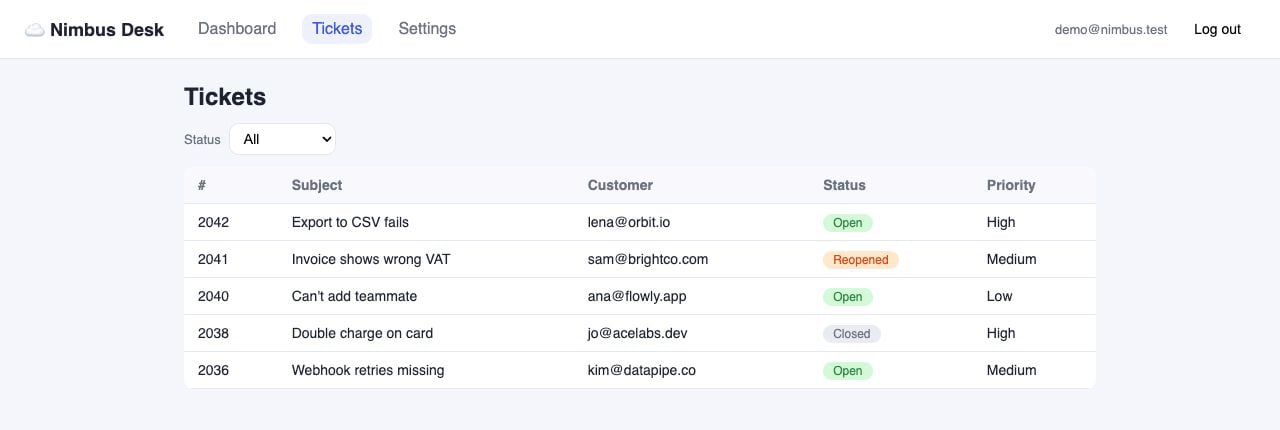
Nimbus Desk is a small support dashboard inside the HoloDesktop CLI checkout. It has a Tickets page with a `Status` dropdown. The behavioral spec says that selecting `Open` should show exactly three open tickets: `#2042`, `#2040`, and `#2036`.
The app contains a realistic status-filter bug. The source looks plausible, but the UI behavior is wrong: the filter compares each ticket's `status` object to the selected string value.
 ## Start Nimbus
From the `holo-desktop-cli` checkout:
```bash theme={null}
uv sync
cd examples/software_qa/nimbus-desk
npm install
npm run dev
```
The app should be available at:
```text theme={null}
http://localhost:5173
```
Demo credentials are shown on the login page:
```text theme={null}
demo@nimbus.test / holo-qa-1
```
## Prepare HoloDesktop CLI
In another terminal, sign in for hosted mode:
```bash theme={null}
cd /path/to/holo-desktop-cli
uv run holo login
```
Or use local mode by making sure the process that launches Claude Code can see:
```bash theme={null}
export HAI_AGENT_RUNTIME_BASE_URL=http://localhost:8000/v1
export HAI_AGENT_RUNTIME_MODEL=Hcompany/Holo-3.1-35B-A3B
```
Nimbus checks in a `.mcp.json` file that points Claude Code at the root HoloDesktop CLI MCP server:
```json theme={null}
{
"mcpServers": {
"holo": {
"command": "uv",
"args": ["run", "--directory", "../../..", "holo", "mcp"]
}
}
}
```
Open Claude Code from the Nimbus workspace so that workspace-local MCP config is active:
```bash theme={null}
cd /path/to/holo-desktop-cli/examples/software_qa/nimbus-desk
claude
```
## Give Claude Code the closed-loop prompt
Ask Claude Code:
```text theme={null}
Add a Priority dropdown beside the Status dropdown on the Tickets page, with
options All, High, Medium, and Low.
After the change, use the local HoloDesktop CLI QA workflow to run the relevant behavioral
spec for the Tickets page. If the CLI reports a failure, inspect the source, make
the minimal fix, and rerun the same spec once to verify the UI.
Do not stop after reporting the bug unless you cannot identify a safe fix.
```
This prompt asks for a normal product change first. Claude Code should edit the app, then use HoloDesktop CLI as a black-box tester. The CLI should catch the existing status-filter bug from the visible UI behavior.
## What should happen
Claude Code should follow this loop:
```mermaid theme={null}
flowchart TD
change["Implement Priority dropdown"] --> qa1["Run tickets-filter spec with HoloDesktop CLI"]
qa1 --> fail["HoloDesktop CLI reports VERDICT: FAILED"]
fail --> inspect["Claude Code inspects Tickets.jsx"]
inspect --> fix["Fix status filtering"]
fix --> qa2["Rerun tickets-filter spec with HoloDesktop CLI"]
qa2 --> pass["HoloDesktop CLI reports VERDICT: PASSED"]
```
The first QA run should fail because selecting `Open` does not show the expected open tickets. Claude Code should then inspect the Tickets page source and fix the filter logic.
## Start Nimbus
From the `holo-desktop-cli` checkout:
```bash theme={null}
uv sync
cd examples/software_qa/nimbus-desk
npm install
npm run dev
```
The app should be available at:
```text theme={null}
http://localhost:5173
```
Demo credentials are shown on the login page:
```text theme={null}
demo@nimbus.test / holo-qa-1
```
## Prepare HoloDesktop CLI
In another terminal, sign in for hosted mode:
```bash theme={null}
cd /path/to/holo-desktop-cli
uv run holo login
```
Or use local mode by making sure the process that launches Claude Code can see:
```bash theme={null}
export HAI_AGENT_RUNTIME_BASE_URL=http://localhost:8000/v1
export HAI_AGENT_RUNTIME_MODEL=Hcompany/Holo-3.1-35B-A3B
```
Nimbus checks in a `.mcp.json` file that points Claude Code at the root HoloDesktop CLI MCP server:
```json theme={null}
{
"mcpServers": {
"holo": {
"command": "uv",
"args": ["run", "--directory", "../../..", "holo", "mcp"]
}
}
}
```
Open Claude Code from the Nimbus workspace so that workspace-local MCP config is active:
```bash theme={null}
cd /path/to/holo-desktop-cli/examples/software_qa/nimbus-desk
claude
```
## Give Claude Code the closed-loop prompt
Ask Claude Code:
```text theme={null}
Add a Priority dropdown beside the Status dropdown on the Tickets page, with
options All, High, Medium, and Low.
After the change, use the local HoloDesktop CLI QA workflow to run the relevant behavioral
spec for the Tickets page. If the CLI reports a failure, inspect the source, make
the minimal fix, and rerun the same spec once to verify the UI.
Do not stop after reporting the bug unless you cannot identify a safe fix.
```
This prompt asks for a normal product change first. Claude Code should edit the app, then use HoloDesktop CLI as a black-box tester. The CLI should catch the existing status-filter bug from the visible UI behavior.
## What should happen
Claude Code should follow this loop:
```mermaid theme={null}
flowchart TD
change["Implement Priority dropdown"] --> qa1["Run tickets-filter spec with HoloDesktop CLI"]
qa1 --> fail["HoloDesktop CLI reports VERDICT: FAILED"]
fail --> inspect["Claude Code inspects Tickets.jsx"]
inspect --> fix["Fix status filtering"]
fix --> qa2["Rerun tickets-filter spec with HoloDesktop CLI"]
qa2 --> pass["HoloDesktop CLI reports VERDICT: PASSED"]
```
The first QA run should fail because selecting `Open` does not show the expected open tickets. Claude Code should then inspect the Tickets page source and fix the filter logic.
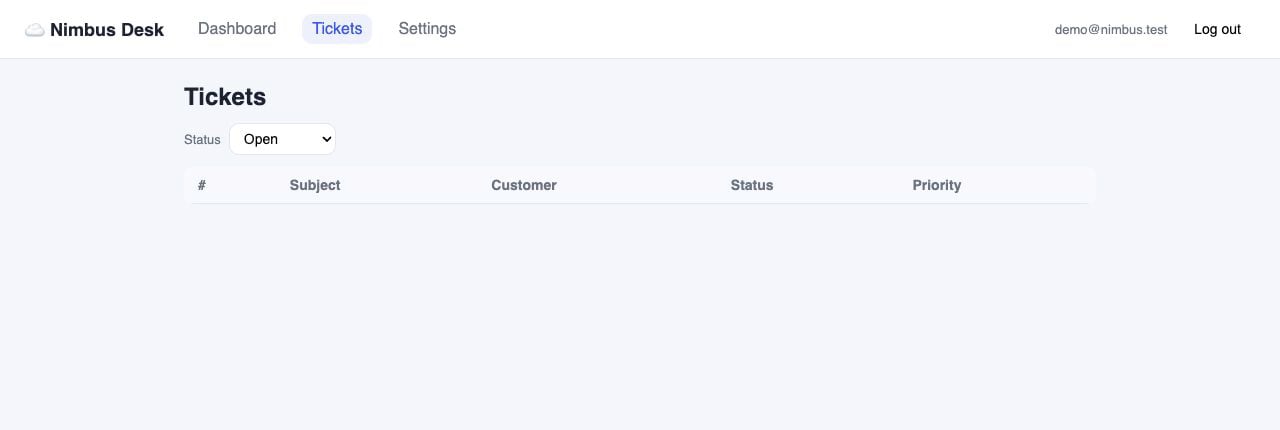 HoloDesktop CLI provides UI evidence, and Claude Code uses that evidence to find the source-level bug.
## The fix Claude Code should discover
The relevant code lives in:
```text theme={null}
examples/software_qa/nimbus-desk/src/pages/Tickets.jsx
```
The broken logic compares an object to a string:
```jsx theme={null}
visible = TICKETS.filter((ticket) => ticket.status === statusFilter);
```
The fix is to compare the ticket's status key:
```jsx theme={null}
visible = TICKETS.filter((ticket) => ticket.status.key === statusFilter);
```
If Claude Code also adds the Priority dropdown, the final implementation should apply both filters. Do not change the QA spec just to make the test pass.
HoloDesktop CLI provides UI evidence, and Claude Code uses that evidence to find the source-level bug.
## The fix Claude Code should discover
The relevant code lives in:
```text theme={null}
examples/software_qa/nimbus-desk/src/pages/Tickets.jsx
```
The broken logic compares an object to a string:
```jsx theme={null}
visible = TICKETS.filter((ticket) => ticket.status === statusFilter);
```
The fix is to compare the ticket's status key:
```jsx theme={null}
visible = TICKETS.filter((ticket) => ticket.status.key === statusFilter);
```
If Claude Code also adds the Priority dropdown, the final implementation should apply both filters. Do not change the QA spec just to make the test pass.
 ## Verify the fix
After the patch, Claude Code should ask HoloDesktop CLI to run the same `tickets-filter` spec again.
A good final result looks like:
```text theme={null}
VERDICT: PASSED
Observed:
- Status dropdown is set to Open.
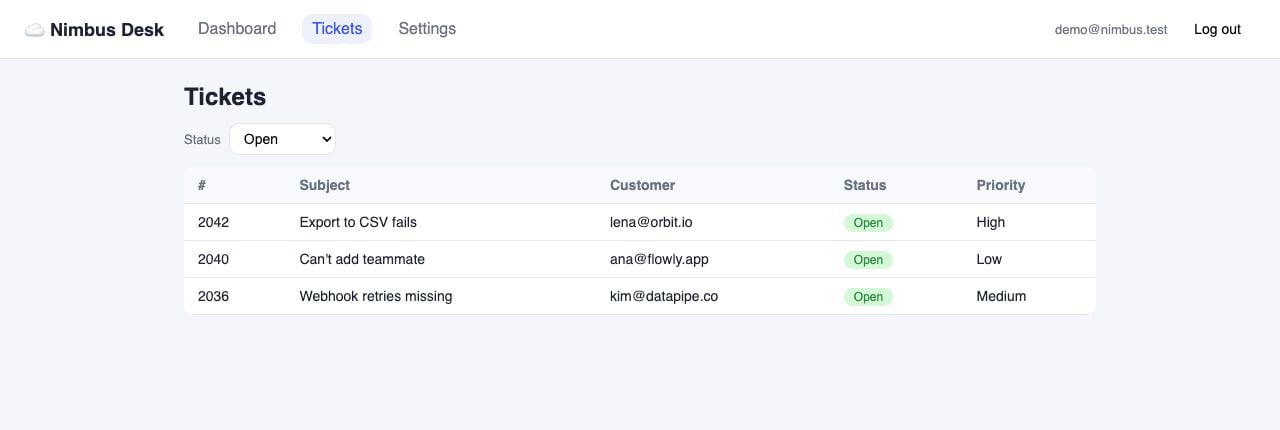
- The table shows exactly #2042, #2040, and #2036.
- No Closed or Reopened tickets are visible.
- No error message appears.
```
## Verify the fix
After the patch, Claude Code should ask HoloDesktop CLI to run the same `tickets-filter` spec again.
A good final result looks like:
```text theme={null}
VERDICT: PASSED
Observed:
- Status dropdown is set to Open.
- The table shows exactly #2042, #2040, and #2036.
- No Closed or Reopened tickets are visible.
- No error message appears.
```
 ## Run a passing QA check too
The ticket spec is useful because it catches a regression. HoloDesktop CLI is also useful when the flow already works. It can produce positive UI evidence that a real user path still behaves correctly.
Nimbus includes a passing chat spec:
```text theme={null}
examples/software_qa/nimbus-desk/qa/chat-widget.md
```
Ask Claude Code to run it after the ticket fix:
```text theme={null}
Now run the HoloDesktop CLI QA spec for the chat widget without changing source.
Treat this as a positive smoke check: sign in, open the chat, send the refund
question, wait for the assistant reply, and report the visible evidence.
```
The expected flow is small but realistic. Starting from a signed-out browser session, HoloDesktop CLI navigates to the app, signs in, lands on the dashboard, opens the chat widget, sends `How do refunds work?`, waits for the assistant response, and verifies that the reply mentions refunds being processed within 5 business days.
## Run a passing QA check too
The ticket spec is useful because it catches a regression. HoloDesktop CLI is also useful when the flow already works. It can produce positive UI evidence that a real user path still behaves correctly.
Nimbus includes a passing chat spec:
```text theme={null}
examples/software_qa/nimbus-desk/qa/chat-widget.md
```
Ask Claude Code to run it after the ticket fix:
```text theme={null}
Now run the HoloDesktop CLI QA spec for the chat widget without changing source.
Treat this as a positive smoke check: sign in, open the chat, send the refund
question, wait for the assistant reply, and report the visible evidence.
```
The expected flow is small but realistic. Starting from a signed-out browser session, HoloDesktop CLI navigates to the app, signs in, lands on the dashboard, opens the chat widget, sends `How do refunds work?`, waits for the assistant response, and verifies that the reply mentions refunds being processed within 5 business days.
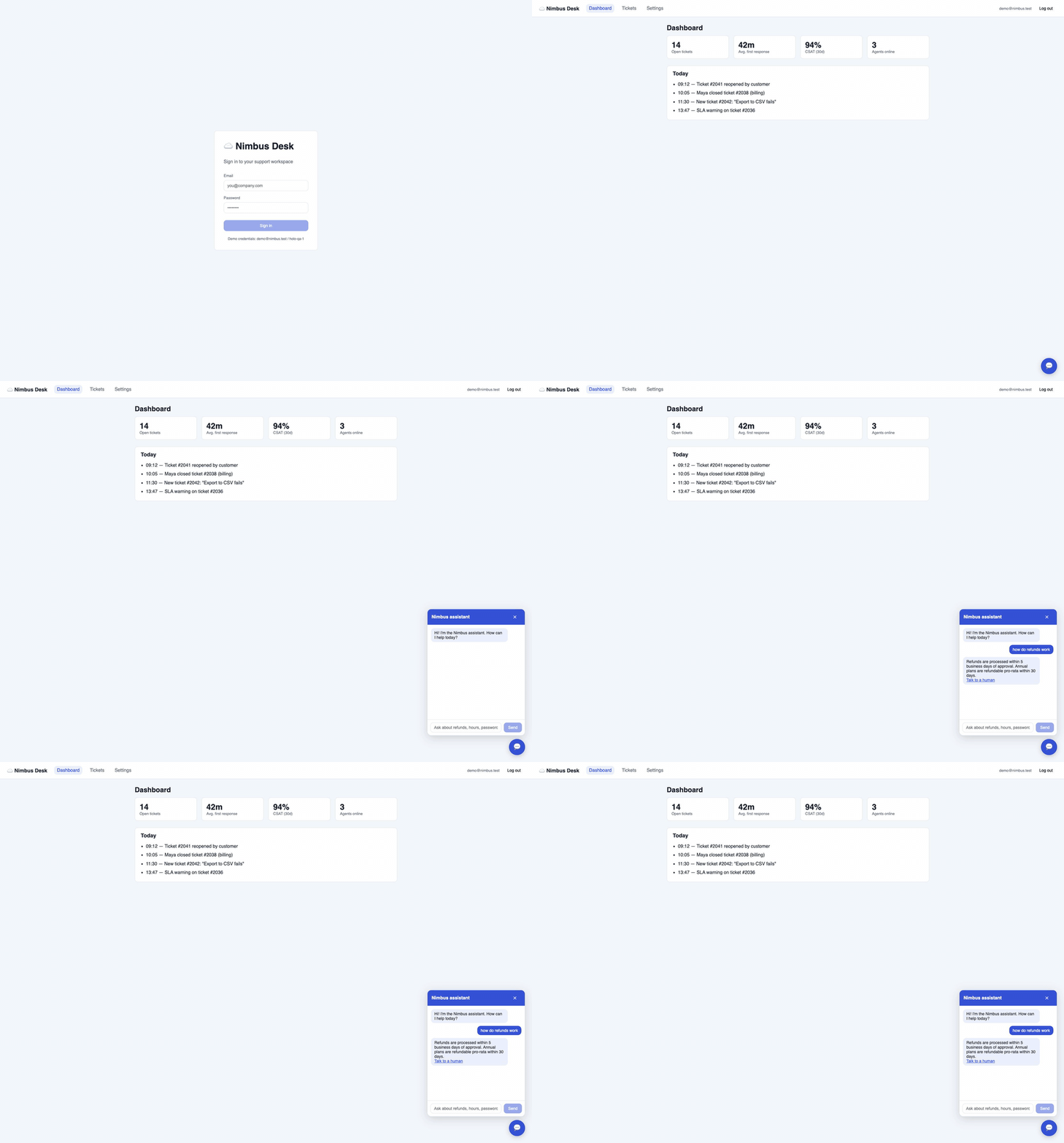 A passing run should read like evidence, not just a green checkbox:
```text theme={null}
VERDICT: PASSED
Observed:
- The dashboard loaded after sign-in.
- The Nimbus assistant opened from the chat bubble.
- The user message appeared in the chat log.
- The assistant replied with refund policy details.
- The reply offered the Talk to a human option.
```
This is the shape of a CI or release smoke test: keep the Markdown spec stable, run HoloDesktop CLI against the built app, and store the final report plus screenshots as artifacts. Unlike a unit test, the evidence is user-visible behavior.
## Why this works
This example works because each system has a clear job:
| System | Role |
| --------------- | ----------------------------------------------------------------------------------- |
| Claude Code | Reads instructions, edits source, reasons about the bug, applies the patch |
| HoloDesktop CLI | Opens the app, signs in, clicks the UI, observes visible behavior, reports evidence |
| QA spec | Defines the expected user-visible behavior in plain Markdown |
The second HoloDesktop CLI run matters. It prevents a code-only fix from being accepted just because the patch looks right.
## Troubleshooting
| Symptom | Try |
| --------------------------------------- | --------------------------------------------------------------------------------------------------------------------------- |
| Claude Code cannot find `holo_desktop` | Open Claude Code from `examples/software_qa/nimbus-desk` so the checked-in `.mcp.json` is active |
| HoloDesktop CLI asks for login | Run `uv run holo login` from the `holo-desktop-cli` checkout, or configure local model env vars before starting Claude Code |
| The app is unreachable | Confirm `npm run dev` is running and `http://localhost:5173` returns `200` |
| HoloDesktop CLI cannot observe or click | Check macOS Screen Recording and Accessibility permissions |
| HoloDesktop CLI reports a failure twice | Stop and inspect both reports; the second failure is usually a different bug or an incomplete fix |
## What to copy into your own project
For your own app, copy the pattern, not the Nimbus details:
1. Write a small Markdown QA spec for one user-visible behavior.
2. Configure Claude Code to call HoloDesktop CLI through MCP.
3. Ask Claude Code to make a product change.
4. Require Claude Code to verify the affected flow with HoloDesktop CLI.
5. If HoloDesktop CLI reports a failure, fix once and verify again.
Use this pattern for authenticated UI flows, visual regressions, settings screens, local web apps, and native apps where source code alone is not enough evidence.
A passing run should read like evidence, not just a green checkbox:
```text theme={null}
VERDICT: PASSED
Observed:
- The dashboard loaded after sign-in.
- The Nimbus assistant opened from the chat bubble.
- The user message appeared in the chat log.
- The assistant replied with refund policy details.
- The reply offered the Talk to a human option.
```
This is the shape of a CI or release smoke test: keep the Markdown spec stable, run HoloDesktop CLI against the built app, and store the final report plus screenshots as artifacts. Unlike a unit test, the evidence is user-visible behavior.
## Why this works
This example works because each system has a clear job:
| System | Role |
| --------------- | ----------------------------------------------------------------------------------- |
| Claude Code | Reads instructions, edits source, reasons about the bug, applies the patch |
| HoloDesktop CLI | Opens the app, signs in, clicks the UI, observes visible behavior, reports evidence |
| QA spec | Defines the expected user-visible behavior in plain Markdown |
The second HoloDesktop CLI run matters. It prevents a code-only fix from being accepted just because the patch looks right.
## Troubleshooting
| Symptom | Try |
| --------------------------------------- | --------------------------------------------------------------------------------------------------------------------------- |
| Claude Code cannot find `holo_desktop` | Open Claude Code from `examples/software_qa/nimbus-desk` so the checked-in `.mcp.json` is active |
| HoloDesktop CLI asks for login | Run `uv run holo login` from the `holo-desktop-cli` checkout, or configure local model env vars before starting Claude Code |
| The app is unreachable | Confirm `npm run dev` is running and `http://localhost:5173` returns `200` |
| HoloDesktop CLI cannot observe or click | Check macOS Screen Recording and Accessibility permissions |
| HoloDesktop CLI reports a failure twice | Stop and inspect both reports; the second failure is usually a different bug or an incomplete fix |
## What to copy into your own project
For your own app, copy the pattern, not the Nimbus details:
1. Write a small Markdown QA spec for one user-visible behavior.
2. Configure Claude Code to call HoloDesktop CLI through MCP.
3. Ask Claude Code to make a product change.
4. Require Claude Code to verify the affected flow with HoloDesktop CLI.
5. If HoloDesktop CLI reports a failure, fix once and verify again.
Use this pattern for authenticated UI flows, visual regressions, settings screens, local web apps, and native apps where source code alone is not enough evidence.