Claude Code can read and edit your project, but it cannot use a running app like a user. HoloDesktop CLI fills that gap: Claude Code delegates a desktop task to the CLI, the CLI operates the app, and Claude Code uses the UI evidence to make and verify a code change.

What you’ll do

In this example, you will:
  • run the Nimbus Desk demo app;
  • open Claude Code from the Nimbus workspace;
  • ask Claude Code to make a small UI change;
  • let Claude Code use HoloDesktop CLI to run the relevant behavioral QA spec;
  • have Claude Code fix the bug that the CLI observes;
  • verify the fix with HoloDesktop CLI.
The point is the closed loop: observe the app, diagnose the source, patch the code, and verify the real UI again.

The scenario

Nimbus Desk is a small support dashboard inside the HoloDesktop CLI checkout. It has a Tickets page with a Status dropdown. The behavioral spec says that selecting Open should show exactly three open tickets: #2042, #2040, and #2036. The app contains a realistic status-filter bug. The source looks plausible, but the UI behavior is wrong: the filter compares each ticket’s status object to the selected string value.
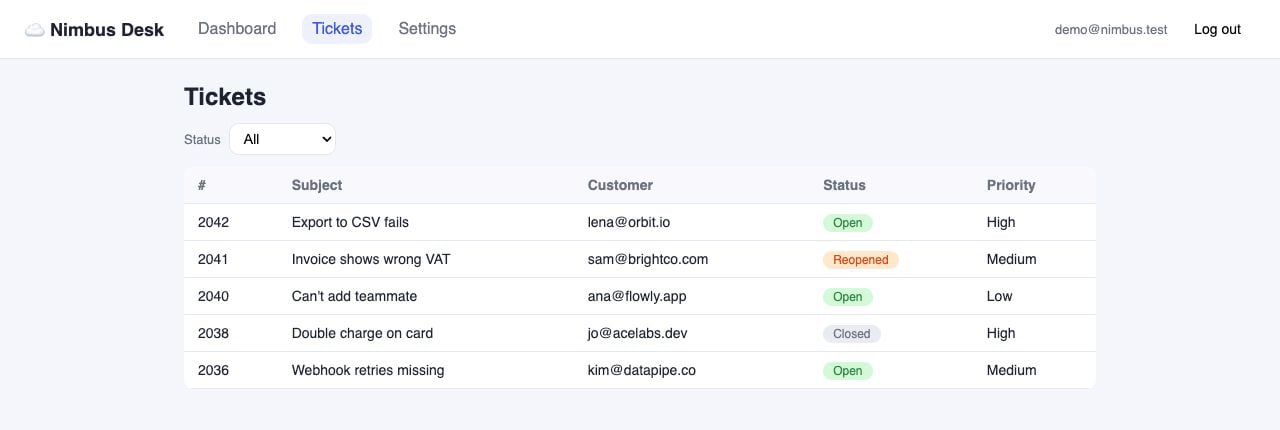
Nimbus Tickets page before filtering is fixed, showing all demo tickets

Start Nimbus

From the holo-desktop checkout:
uv sync
cd examples/software_qa/nimbus-desk
npm install
npm run dev
The app should be available at:
http://localhost:5173
Demo credentials are shown on the login page:
demo@nimbus.test / holo-qa-1

Prepare HoloDesktop CLI

In another terminal, sign in for hosted mode:
cd /path/to/holo-desktop
uv run holo login
Or use local mode by making sure the process that launches Claude Code can see:
export HAI_AGENT_RUNTIME_BASE_URL=http://localhost:8000/v1
export HAI_AGENT_RUNTIME_MODEL=Hcompany/Holo-3.1-35B-A3B
Nimbus checks in a .mcp.json file that points Claude Code at the root HoloDesktop CLI MCP server:
{
  "mcpServers": {
    "holo": {
      "command": "uv",
      "args": ["run", "--directory", "../../..", "holo", "mcp"]
    }
  }
}
Open Claude Code from the Nimbus workspace so that workspace-local MCP config is active:
cd /path/to/holo-desktop/examples/software_qa/nimbus-desk
claude

Give Claude Code the closed-loop prompt

Ask Claude Code:
Add a Priority dropdown beside the Status dropdown on the Tickets page, with
options All, High, Medium, and Low.

After the change, use the local HoloDesktop CLI QA workflow to run the relevant behavioral
spec for the Tickets page. If the CLI reports a failure, inspect the source, make
the minimal fix, and rerun the same spec once to verify the UI.

Do not stop after reporting the bug unless you cannot identify a safe fix.
This prompt asks for a normal product change first. Claude Code should edit the app, then use HoloDesktop CLI as a black-box tester. The CLI should catch the existing status-filter bug from the visible UI behavior.

What should happen

Claude Code should follow this loop: The first QA run should fail because selecting Open does not show the expected open tickets. Claude Code should then inspect the Tickets page source and fix the filter logic.
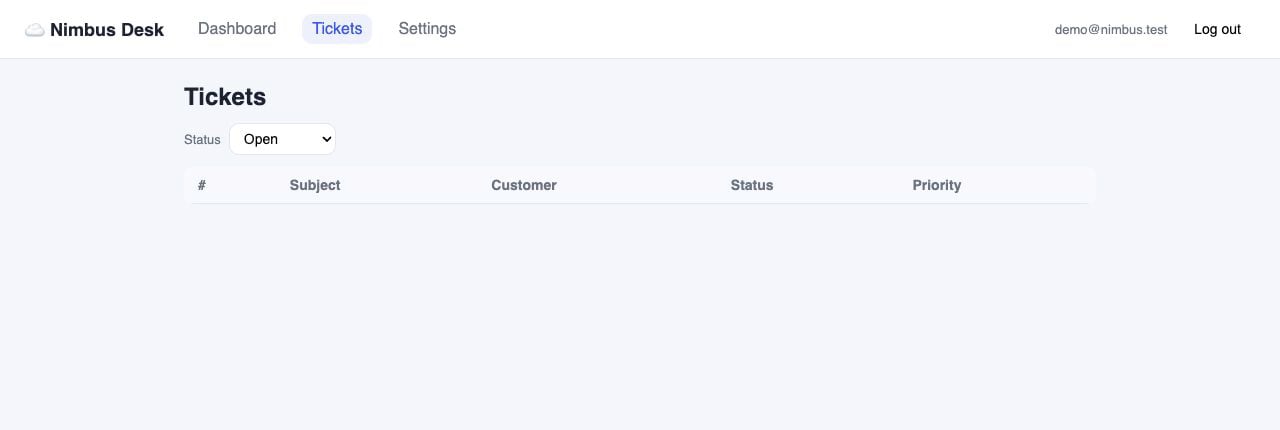
Nimbus Tickets page with Status set to Open and no visible ticket rows
The handoff is simple: HoloDesktop CLI provides UI evidence, and Claude Code uses that evidence to find the source-level bug.

The fix Claude Code should discover

The relevant code lives in:
examples/software_qa/nimbus-desk/src/pages/Tickets.jsx
The broken logic compares an object to a string:
visible = TICKETS.filter((ticket) => ticket.status === statusFilter);
The fix is to compare the ticket’s status key:
visible = TICKETS.filter((ticket) => ticket.status.key === statusFilter);
If Claude Code also adds the Priority dropdown, the final implementation should apply both filters. Do not change the QA spec just to make the test pass.
Source diff showing the ticket filter comparison fix

Verify the fix

After the patch, Claude Code should ask HoloDesktop CLI to run the same tickets-filter spec again. A good final result looks like:
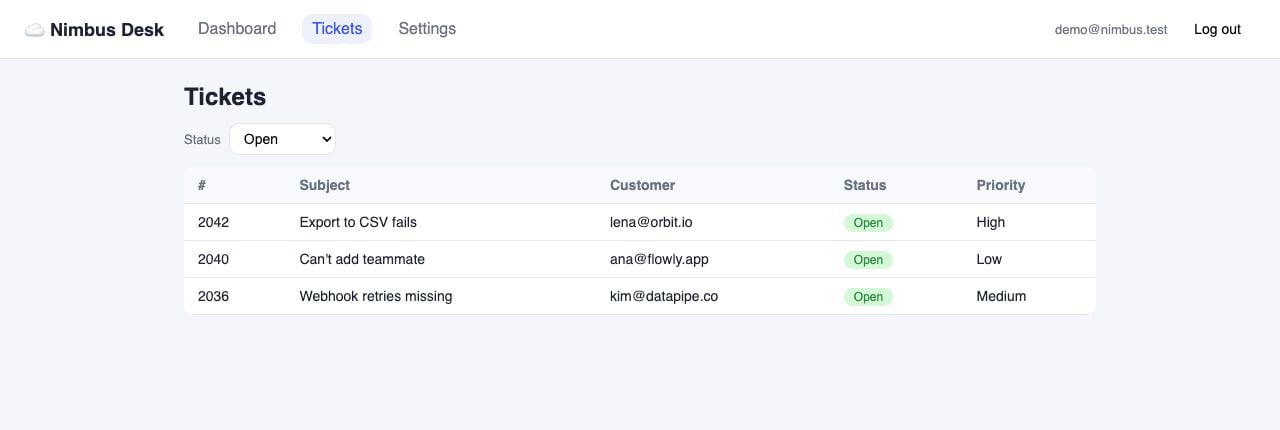
VERDICT: PASSED

Observed:
- Status dropdown is set to Open.
- The table shows exactly #2042, #2040, and #2036.
- No Closed or Reopened tickets are visible.
- No error message appears.
Nimbus Tickets page after filtering is fixed, showing three open tickets

Run a passing QA check too

The ticket spec is useful because it catches a regression. HoloDesktop CLI is also useful when the flow already works. It can produce positive UI evidence that a real user path still behaves correctly. Nimbus includes a passing chat spec:
examples/software_qa/nimbus-desk/qa/chat-widget.md
Ask Claude Code to run it after the ticket fix:
Now run the HoloDesktop CLI QA spec for the chat widget without changing source.
Treat this as a positive smoke check: sign in, open the chat, send the refund
question, wait for the assistant reply, and report the visible evidence.
The expected flow is small but realistic. Starting from a signed-out browser session, HoloDesktop CLI navigates to the app, signs in, lands on the dashboard, opens the chat widget, sends How do refunds work?, waits for the assistant response, and verifies that the reply mentions refunds being processed within 5 business days.
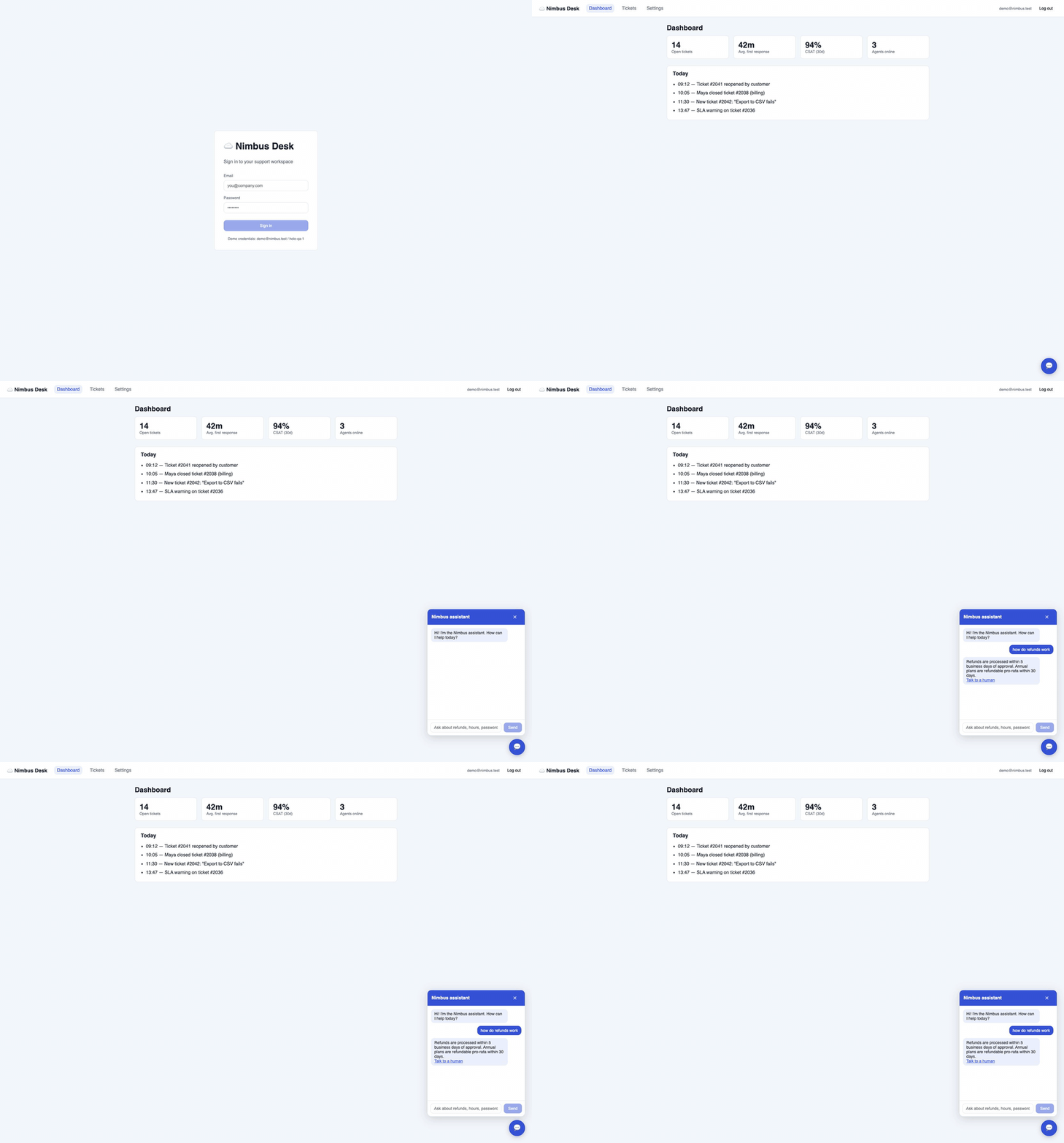
Animated GIF of HoloDesktop CLI signing into Nimbus, opening the chat widget, asking about refunds, and observing the expected refund policy response
A passing run should read like evidence, not just a green checkbox:
VERDICT: PASSED

Observed:
- The dashboard loaded after sign-in.
- The Nimbus assistant opened from the chat bubble.
- The user message appeared in the chat log.
- The assistant replied with refund policy details.
- The reply offered the Talk to a human option.
This is the shape of a CI or release smoke test: keep the Markdown spec stable, run HoloDesktop CLI against the built app, and store the final report plus screenshots as artifacts. Unlike a unit test, the evidence is user-visible behavior.

Why this works

This example works because each system has a clear job:
SystemRole
Claude CodeReads instructions, edits source, reasons about the bug, applies the patch
HoloDesktop CLIOpens the app, signs in, clicks the UI, observes visible behavior, reports evidence
QA specDefines the expected user-visible behavior in plain Markdown
The second HoloDesktop CLI run matters. It prevents a code-only fix from being accepted just because the patch looks right.

Troubleshooting

SymptomTry
Claude Code cannot find holo_desktopOpen Claude Code from examples/software_qa/nimbus-desk so the checked-in .mcp.json is active
HoloDesktop CLI asks for loginRun uv run holo login from the holo-desktop checkout, or configure local model env vars before starting Claude Code
The app is unreachableConfirm npm run dev is running and http://localhost:5173 returns 200
HoloDesktop CLI cannot observe or clickCheck macOS Screen Recording and Accessibility permissions
HoloDesktop CLI reports a failure twiceStop and inspect both reports; the second failure is usually a different bug or an incomplete fix

What to copy into your own project

For your own app, copy the pattern, not the Nimbus details:
  1. Write a small Markdown QA spec for one user-visible behavior.
  2. Configure Claude Code to call HoloDesktop CLI through MCP.
  3. Ask Claude Code to make a product change.
  4. Require Claude Code to verify the affected flow with HoloDesktop CLI.
  5. If HoloDesktop CLI reports a failure, fix once and verify again.
Use this pattern for authenticated UI flows, visual regressions, settings screens, local web apps, and native apps where source code alone is not enough evidence.